Premade layouts
Every look you reach for, ready to go
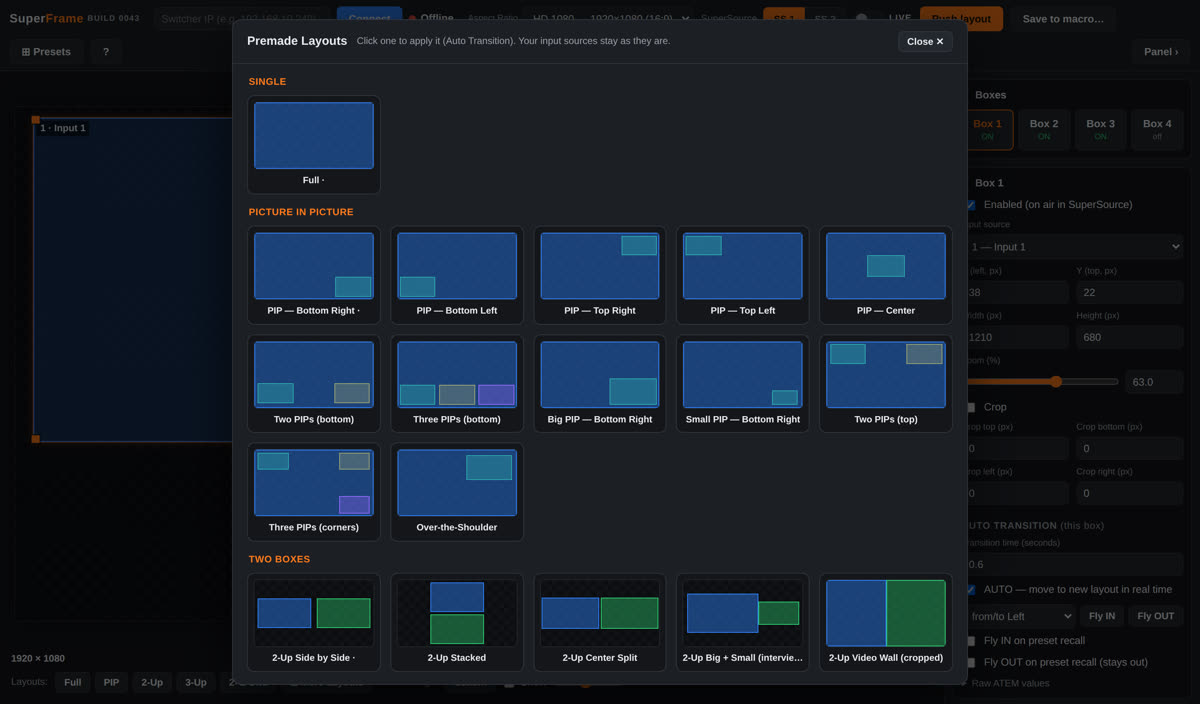
Browse the full library as thumbnails and apply any one with the Auto Transition — your input sources stay put.
A visual editor that speaks your resolution — 1080p, 4K, and 8K — instead of an abstract 1–100 grid.
Drag the four SuperSource boxes on a visual canvas, or type exact X / Y / Width / Height in real pixels. Snapping to edges, centres, and other boxes keeps everything aligned.
Full, PIP in every corner, 2/3/4-ups, quad grids, big-plus-sidebar, and CNN-style cropped video walls — each a click away, applied with a smooth transition.
Hold Control and drag to crop any edge, or crop both sides symmetrically to keep a subject centred. Crops animate smoothly during transitions.
Boxes glide, scale, and zoom to their new spots in real time — the ATEM® has no native animation, so SuperFrame streams ~30 updates a second to make it move.
Switch between HD 720p, 1080, 4K UHD, and 8K UHD and every layout rescales to the correct pixel counts automatically — or follow the switcher on Auto.
Design inside a custom pixel region — like a 3360×1260 LED wall inside a 4K frame — with one-click Auto Adjust to fit a whole layout into it.
Browse the full library as thumbnails and apply any one with the Auto Transition — your input sources stay put.